If you’re new to computers, you often hear terms like hardware and software. They sound technical, but the difference is actually quite simple!
Think of your computer, tablet, or smartphone as a team. For that team to work, it needs two essential things: a body and a brain (or instructions).
What is Hardware? The Body 🦾
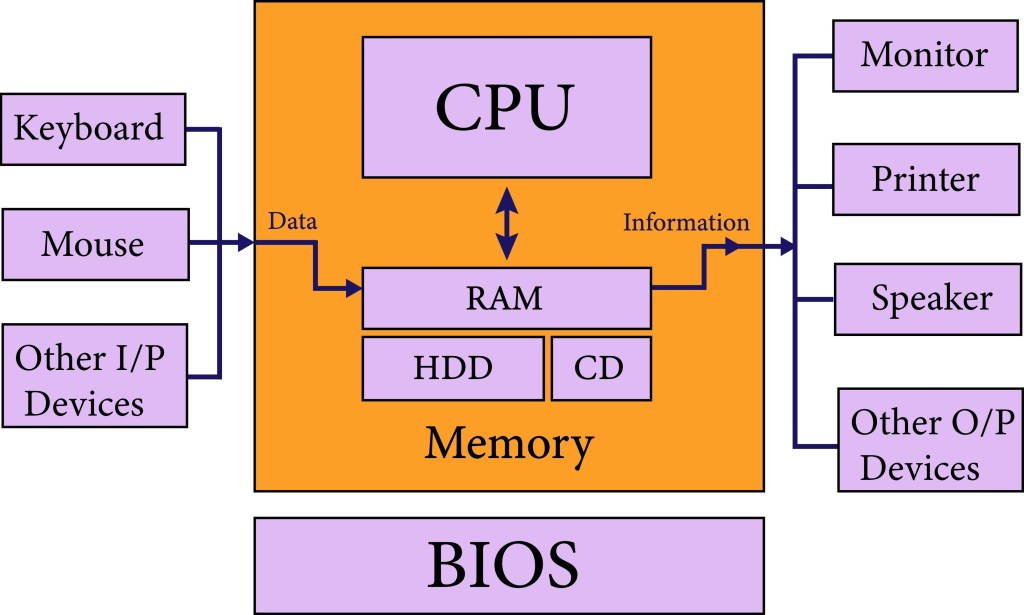
Hardware is any physical part of the computer that you can touch, see, and feel. It’s the “body” of the machine.
If you were to take your computer apart (which you shouldn’t do!), every single piece inside and outside would be hardware.
Key Examples of Hardware:
- The Case: The metal or plastic box that holds everything together.
- The Screen (Monitor): What you look at.
- The Keyboard and Mouse: How you give the computer instructions.
- The CPU (Central Processing Unit): The tiny chip that acts as the computer’s brain.
- The RAM (Memory): The short-term memory chips that help the computer think quickly.
- The Hard Drive or SSD (Storage): Where all your files and programs are permanently saved.
- Printers and Speakers: Physical devices that attach to your computer.
The Key Rule: If you can drop it on your foot, it’s hardware. It can’t do anything useful without the instructions given by the software.
What is Software? The Brain and Instructions 🧠
Software is the collection of instructions, data, or programs that tell the hardware what to do. It’s the “brain,” the “personality,” and the “tasks” of the machine.
You can’t physically touch software; you can only interact with it on a screen.
Key Examples of Software:
- Operating Systems (OS): This is the most important type of software. It manages the hardware and makes the whole computer run. Examples include Windows, macOS, Linux, and the operating system on your phone (Android or iOS).
- Applications (Apps): Programs designed to do specific tasks.
- Productivity: Microsoft Word, Google Docs, Excel.
- Web Browsers: Chrome, Safari, Firefox.
- Entertainment: Video games, Netflix app, YouTube app.
- Computer Code: The specific instructions written by programmers to create the apps and OS.
The Key Rule: If you can accidentally delete it, it’s software. It can’t run unless there is physical hardware to give it power and display it.
The Big Difference: A Simple Analogy 🧱
To truly understand the relationship between hardware and software, let’s use a simple analogy:
| Category | Analogy | Computer Term | Description |
| Hardware | The DVD Player | Physical Device | The machine that plugs into the wall and reads the disc. |
| Software | The DVD Disc | Program/Data | The digital movie, music, or video game on the disc. |
- Without the DVD Player (Hardware), the disc is just plastic.
- Without the DVD Disc (Software), the player can’t play a movie.
They need each other! Software makes the hardware useful, and hardware provides the platform for the software to run.
Why Should a Beginner Care About This?
Understanding this difference helps you:
- Troubleshoot Problems: If your keyboard stops working, you know to check the hardware connection. If an app keeps crashing, you know the problem is likely with the software.
- Upgrade Strategically: If your computer is slow, knowing the difference between the RAM (hardware) and the number of programs running (software) helps you decide if you need to buy a memory upgrade or just close some tabs.
Now you know! The powerful machine sitting in front of you is a perfect partnership between the physical machine (hardware) and the instructions that bring it to life (software).






Leave a comment